Heads up: It's time to upgrade your Microsoft Graph PowerShell module. Microsoft released a newer version, 2.13.1.
1. Adds custom header support and content type detection for input files.
2. Remove dead code.
3. Examples Updated.
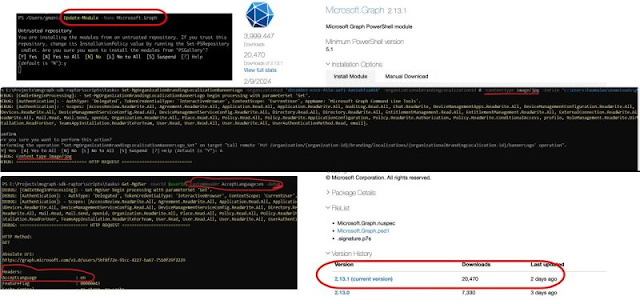
Heads up: It's time to upgrade your Microsoft Graph PowerShell module. Microsoft released a newer version, 2.13.1.
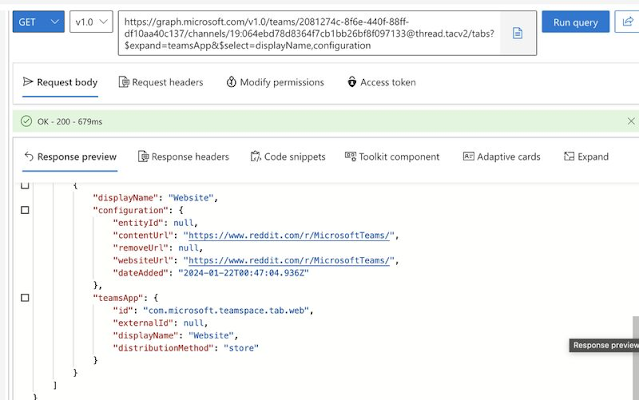
Heads up! If you're using the Website tab in your Teams Channels or Group Chats to connect your Line of Business (LOB) applications, you need to take note of this important message. Currently, you can easily add the Website app as a tab in your Teams, which allows you to view and interact with the data within Teams client.
However, effective April 2024, Microsoft Teams will discontinue the ability to load websites inside the new Teams client when using the Website tab. Instead, these website links will open in a new browser tab. This change is being implemented to align with the latest best practices in web security and privacy, while also improving the reliability of websites opened through this feature.
You can utilize Graph API and Graph PowerShell SDK for analyzing your environment to gain insights into app usage and plan for user communication, if necessary.
The latest version of Microsoft Graph PowerShell SDK offers a plethora of new and upgraded features. It's advisable to upgrade your current PowerShell SDK module to version 2.0 and make the most of these features.
What has changed?
It's important to note that Connect-MgGraph will automatically connect to V1.0 by default.




Connect-MgGraph.-Period in Reports module and -ConsistencyLevel parameter.-Filter values.-WhatIf on supported commands.-ForceRefresh on Connect-MgGraph.<Verb>-Mg<Noun> to <Verb>-MgBeta<Noun>.DeviceManagement.Enrolment module to DeviceManagement.Enrollment.DeviceManagement.Enrollment to Identity.Governance module.Microsoft.Graph.PowerShell.Models.<Entity> to Microsoft.Graph.Beta.PowerShell.Models.<Entity>.-AccessToken type on Connect-MgGraph from String to SecureString- Releases major updates for Get-CsOnlineUser with significant performance improvements and new filtering capabilities to scenarios without the "-Identity" parameter.
- Performance improvements, especially with "-Filter" scenarios like using wildcard operator (*), OnPrem* and Timestamp attributes.
- New attributes have now been introduced in the output to ensure parity with scenarios involving the "-Identity" parameter: CountryAbbreviation, SipProxyAddress, TeamsMediaLoggingPolicy, UserValidationErrors, WhenCreated.
- These attributes are now enabled for filtering: Alias, City, CompanyName, CompanyName, HostingProvider, UserValidationErrors, OnPremEnterpriseVoiceEnabled, OnPremHostingProvider, OnPremLineURI, OnPremSIPEnabled, SipAddress, SoftDeletionTimestamp, State, Street, TeamsOwnersPolicy, WhenChanged, WhenCreated, FeatureTypes, PreferredDataLocation, LastName.
- These filtering operators have been reintroduced into Get-CsOnlineUser:
- "-like" operator now supports the use of wildcard operators in 'contains' and 'ends with' scenarios.
Example: Get-CsOnlineUser -Filter "DisplayName -like '*abc*'"
- "-contains" can now be used to filter properties that are an array of strings like FeatureTypes, ProxyAddresses and ShadowProxyAddresses.
Example: Get-CsOnlineUser -Filter {FeatureTypes -contains "PhoneSystem"}
- "-gt" (greater than), "-lt" (less than), "-le" (less than or equal to) can now be used for filtering all string properties. Example: Get-CsOnlineUser -Filter {UserPrincipalName -gt/-le/-lt "abc"}
- "-ge" (greater than or equal to) can now also be used for filtering on policies. Example: Get-CsOnlineUser -Filter {ExternalAccessPolicy -ge "xyz_policy"}
- Updates to the type of users displayed:
- Unlicensed Users - Unlicensed users would show up in the output for 30 days post-license removal.
- Soft deleted users - These users will be displayed in the output with SoftDeletionTimestamp set to a value.
It's time for IT admins to install the new Microsoft Teams PowerShell module to manage more Teams Call Queue, Validating Voicemail, DialPlan & Normalization rules.

- Adds Certificate parameter to Connect-MicrosoftTeams.
- Adds WelcomeTextToSpeechPrompt parameter to [New|Set]-CsCallQueue.
- Fixes issues with pipeline input for Test-CsEffectiveTenantDialPlan & Test-CsVoiceNormalizationRule cmdlets.
- Releases [Get|Set]-CsOnlineVoicemailValidationConfiguration cmdlets.
- Releases [Get|Set|Grant|Remove|New]-CsTeamsMeetingBrandingPolicy cmdlets.
- In CsTeamsMeetingBrandingPolicy cmdlets, there is a known issue that prevents using the 'Remove' list modifier when trying to delete a TeamsMeetingBrandingTheme or a NdiAssuranceSlate. To remove all elements from MeetingBrandingThemes, the workaround is setting the values to null, example: Set-CsTeamsMeetingBrandingPolicy -Identity <Identity> -MeetingBrandingThemes $null -DefaultTheme "".
To update the MeetingBrandingThemes, use the [Set]-CsTeamsMeetingBrandingPolicy cmdlet and pass the list of desired MeetingBrandingThemes created with the [New]-CsTeamsMeetingBrandingTheme cmdlet. Example:
$exampleMeetingBrandingTheme = New-CsTeamsMeetingBrandingTheme -DisplayName "exampleTheme" -LogoImageLightUri "https://contoso.com/light.jpg" -LogoImageDarkUri "https://contoso.com/dark.jpg" -BackgroundImageLightUri "https://contoso.com/backgroundlight.jpg" -BackgroundImageDarkUri "https://contoso.com/backgrounddark.jpg" -BrandAccentColor "#000000" -Enabled $true -Identity "exampleTheme"
And then set the themes using the Set cmdlet:
Set-CsTeamsMeetingBrandingPolicy -Identity <Identity> -MeetingBrandingThemes @($exampleMeetingBrandingTheme) -DefaultTheme "exampleTheme"
Use the same approach for removing elements from NdiAssuranceSlate, using the [New]-CsTeamsNdiAssuranceSlate cmdlet and then using Set-CsTeamsMeetingBrandingPolicy to properly set the values.
This will be fixed in the next TPM version.
- Releases [New]-CsTeamsMeetingBackgroundImage cmdlet.
- Releases [New]-CsTeamsMeetingBrandingTheme cmdlet.
- Releases [New]-CsTeamsNdiAssuranceSlate cmdlet.
- Contains a new implementation of [New|Get|Set|Remove]-CsTeamsCallHoldPolicy, [New|Get|Set|Remove]-CsTeamsEmergencyCallingPolicy, [New]-CsTeamsEmergencyCallingExtendedNotification. Functionality remains the same as previous implementation.


